Overview & what’s included.
RIVISTA is an editorial WordPress theme for fashion, design and lifestyle brands. It pairs a magazine-style front end with a complete WooCommerce storefront, and ships a one-click demo that builds the whole site for you.
Nothing in the theme depends on a page builder, an animation library or a remote service. Every layout is plain WordPress content styled by the theme, every script is vanilla JavaScript, and every font and photograph travels inside the package.
Homepage layouts
The built-in “Outfit of the day” editorial front page plus 20 imported demo homepages.
Demo pages
Imported by the one-click demo; 66 of them are RIVISTA layout pages.
Colour packs
Light, dark-footer and fully dark packages, switched in the Customizer.
Font pairings
System-safe typography presets; the default pairing uses the bundled typefaces.
Remote requests
No CDN, no web-font service, no analytics. Fonts and demo photography are local files.
Demo products
Real WooCommerce products, plus 6 journal posts and 5 product categories.
What is inside the download
| Item | What it is |
|---|---|
rivista-theme.zip | The installable theme. This is the file you upload to WordPress. |
documentation/ | This manual — index.html plus its media/ screenshots. One self-contained folder, no internet needed. It travels inside the theme, so it is always available on the server. |
readme.txt | Theme readme with requirements, recommended plugins and the changelog. |
LICENSE · THIRD-PARTY-CREDITS.md | GPLv2-or-later notice and the full credits list for fonts and demo photography. |
languages/rivista.pot | Translation template — 344 translatable entries in version 1.4.0 — text domain rivista. |
demo-content/ | The demo WXR file and all demo photography, used by the one-click import. |
inc/plugins/rivista-core.zip | The optional companion plugin with the three Elementor widgets and the four section shortcodes. |
What the theme does not do
So you can plan around it: RIVISTA does not register custom post types, does not include a page builder, does not ship a slider plugin, and does not add product filters, a currency switcher or a live-search plugin. Product data, stock, reviews, shipping and taxes all come from WooCommerce.
The only things it registers beyond templates and Customizer settings are one block style and one block pattern. The four section shortcodes — [rivista_products], [rivista_journal], [rivista_values] and [rivista_newsletter] (section 11) — are implemented by the bundled RIVISTA Core plugin: it owns both the tags and the render code behind them, so shortcode content keeps rendering even after a theme switch, while this theme’s stylesheets give the sections their full design. The front page’s values and newsletter bands come from the same plugin functions — without RIVISTA Core they are simply omitted and the rest of the front page is unaffected. Pages that use the shortcodes — including several of the imported demo homepages — need RIVISTA Core active, or the tags print as plain text.
Requirements.
RIVISTA runs on a standard WordPress host. The only firm numbers are the ones in the theme header.
| Requirement | Minimum | Notes |
|---|---|---|
| WordPress | 6.0 | Version 1.4.0 was tested up to WordPress 7.1. Recent WooCommerce releases require a newer WordPress than the theme minimum, so check WooCommerce’s own requirement before you install it. |
| PHP | 7.4 | Tested on PHP 8.2. No PHP 8-only syntax is used, so 7.4 hosts are safe. |
| WooCommerce | Optional | Needed for the shop, cart, checkout, account and every commerce feature in section 09. Version 1.4.0 was verified against WooCommerce 10.9.1. |
| PHP extensions | SimpleXML / libxml | Used by the demo import when it restores the bundled page layouts. Present on virtually every host. |
| Uploads folder | Writable | The importer writes a prepared copy of the demo file into wp-content/uploads. |
| Permalinks | Pretty permalinks | Several demo links point at paths such as /shop/ and /lookbook/. Plain permalinks will break them. |
The demo file is roughly 1.1 MB and the importer copies 16 photographs out of the theme’s own folder into your Media Library — nothing is requested from a third-party server. The theme never changes your PHP limits. If your host is tight, ask them to allow at least memory_limit 256M and max_execution_time 300 for the duration of the import.
Installation.
A fresh WordPress install gives the cleanest result. If you are installing over an existing site, back up the database and the uploads folder first.
Install the theme
Unzip the package you downloaded from the marketplace and find
rivista-theme.zip. That single file is the theme; the rest of the download is documentation and licences.In WordPress go to Appearance → Themes → Add New → Upload Theme, choose
rivista-theme.zipand press Install Now.Press Activate.
Alternatively, upload the unzipped
rivistafolder towp-content/themes/over FTP or SFTP, then activate it from Appearance → Themes.
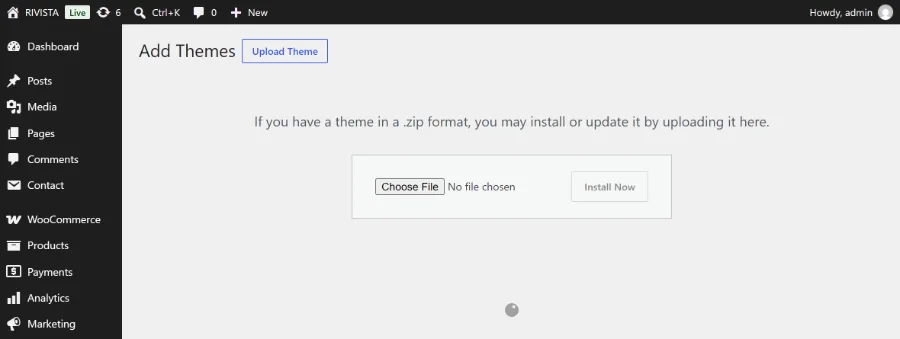
rivista-theme.zip — not the whole marketplace download — and press Install Now.That message means the whole marketplace download was uploaded instead of the theme. Unzip it and upload rivista-theme.zip only.
Plugins
After activation a dashboard notice appears and a new screen is added at Appearance → Install Plugins. Every plugin there is recommended, not required — the theme works without them, with the matching features simply absent.
| Plugin | Source | Needed for |
|---|---|---|
| WooCommerce | wordpress.org | Products, cart, checkout, account, and every feature in section 09. |
| One Click Demo Import | wordpress.org | The RIVISTA Complete Demo import (section 04). |
| Contact Form 7 | wordpress.org | A working contact form, and the form imported with the demo. |
| RIVISTA Core | Bundled with the theme, version 1.3.0 | The three Elementor widgets (section 10) and the four section shortcodes (section 11). Installs from inc/plugins/rivista-core.zip inside the theme — no download needed. |
| Elementor Page Builder | wordpress.org | Only if you want to build pages with Elementor. The demo content contains no Elementor data. |
Open Appearance → Install Plugins.
Install and activate WooCommerce, Contact Form 7 and One Click Demo Import before importing the demo — products and forms are skipped if their plugins are missing at import time.
Install RIVISTA Core — it implements the four section shortcodes the demo homepages use, and (with Elementor) the Elementor widgets.
Run the WooCommerce setup wizard when it offers itself, or skip it and configure the store later from WooCommerce → Settings.
One-click demo import.
One import builds the entire demo site: every page, the journal, ten products, the photography, the menus and the front-page settings. There is a single import package — all twenty homepage demos arrive together.
Before you start
- Use a fresh site, or back up an existing one. The import adds content; it does not remove yours, but it does delete WordPress’s own “Sample Page” and “Hello world!” when they are still untouched.
- Activate WooCommerce, Contact Form 7 and One Click Demo Import first.
- Make sure
wp-content/uploadsis writable and that the server can request its own URLs — the photographs are fetched from the theme folder over HTTP.
Run the import
Open Appearance → Import Demo Data.
The theme registers a single import — RIVISTA Complete Demo: “Pages, journal posts, products, media, and navigation from the complete RIVISTA demo.” Because it is the only one, One Click Demo Import shows the theme card rather than a list. Press Import Demo Data and confirm.
Leave the tab open. The importer works in batches and the photographs are copied one by one; on a modest host this takes a few minutes.
Wait for the completion screen before navigating away. The final step rebuilds menus, assigns pages and flushes permalinks.
Visit the site. You should land on the editorial home page with the announcement ticker running above the header.
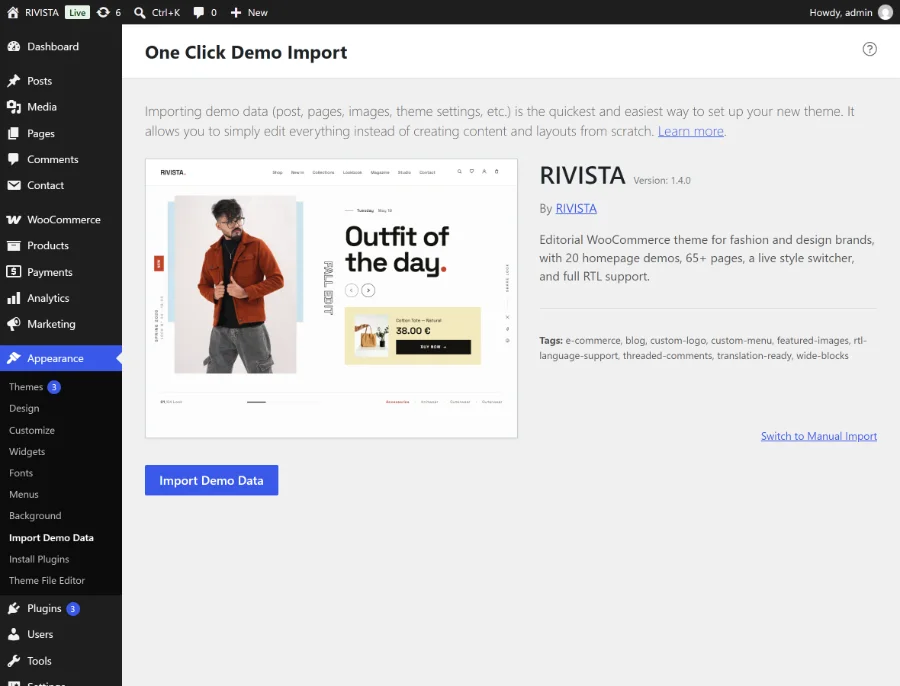
What gets imported
| Content | Count | Notes |
|---|---|---|
| Pages | 72 | Your site will show 74, because WordPress and WooCommerce create the “Privacy Policy” and “Refund and Returns Policy” drafts on their own. 66 of the imported pages use the RIVISTA Demo Full Width template. |
| Journal posts | 6 | On Object Permanence · The Mills of Normandy · A Week in Porto · Why We Mend · Linen, Explained · Slow Thursdays. |
| Products | 10 | Simple products, two of them on sale, four marked featured. No SKUs, stock management, attributes or variations — prices are plain numbers, so they render in whatever currency your store uses. |
| Product categories | 5 | Accessories, Home, Knitwear, Outerwear, Tees. |
| Post categories | 4 | Journal, Materials, Cities, Studio Notes. |
| Media | 16 photographs | Plus the WooCommerce placeholder image and the importer’s own log file. |
| Menus | 7 menus, 28 items | Primary, Mobile, four footer columns and Legal. See the table below. |
| Contact form | 1 | A Contact Form 7 form named “Contact form 1”. |
What happens after the import
The theme finishes the setup for you. In order, it:
- Assigns the RIVISTA layout template and per-page styling to every imported layout page.
- Sets Settings → Reading to a static front page: Home as the front page and Magazine as the posts page.
- Points WooCommerce at the imported Shop, Cart, Checkout and My account pages, and removes any duplicate copies the importer created.
- Turns WooCommerce’s “Coming soon” site visibility off, so the store becomes publicly visible.
- Sets the header style to Standard and the layout direction to Left to right.
- Writes the announcement ticker text. It always ends with “New drop every Thursday | 30-day easy returns”. A free-shipping message is put in front of those only when your store already offers free shipping: “Free shipping over $80” in your own currency, rounded to whole units by WooCommerce’s own price formatting, when a Free shipping method carries a minimum order amount; a plain “Free shipping” when one carries none; and nothing at all when the store has no free-shipping method, or when WooCommerce is not active.
- Rebuilds all seven menus from scratch, flat, and assigns them to their locations.
- Moves WordPress’s five install-time widgets out of the footer into Inactive Widgets — they are never deleted, and widgets you added yourself are never touched.
- Flushes the permalink rules.
Your site title, tagline, store currency and permalink structure are deliberately left alone, as are the colour pack, font pairing, style switcher and newsletter shortcode.
| Menu location | Menu | Items |
|---|---|---|
| Primary Menu | Primary | Shop, Lookbook, Magazine, About, Contact |
| Mobile Menu | Mobile | Shop, Lookbook, Magazine, About, Contact |
| Footer Column 1 | Footer Shop | Collections, Shop, Gift Cards, Wishlist |
| Footer Column 2 | Footer Discover | Style Quiz, Lookbook, Magazine, Sustainability |
| Footer Column 3 | Footer Company | About, Stores, Careers, Press |
| Footer Column 4 | Footer Help | FAQ, Shipping & Returns, Size Guide, Contact |
| Legal Links | Legal | Privacy, Terms |
| Social Links | — | Not created by the import. Build your own (section 05). |
- The store is now publicly visible. If you are not ready to sell, switch site visibility back to “Coming soon” under WooCommerce → Settings → Site visibility until payments, shipping and tax are configured.
- Open Contact → Contact Forms → Contact form 1 → Mail and replace the demo To and From addresses with your own before you publish the contact page.
- Delete the six pages that describe the theme rather than your store: Presentation, Demos, All Pages, Map, Promo and Documentation. The imported Documentation page in particular is an old placeholder — this file is the current manual.
- The demo photography is licensed for demonstration only. Replace it with your own images before launch (section 17).
Import troubleshooting
memory_limit and max_execution_time on the host and run the import again. Re-running is safe: the WordPress importer skips posts it already created, and the menus are rebuilt from scratch every time.wp-content/uploads writable and reload the screen.Site setup after import.
Ten minutes of settings turn the demo into your shop. Work down this list in order.
Front page and blog
The import already sets these, but this is where you change them. Open Settings → Reading, keep A static page selected, and choose your homepage — the built-in Home, or any of the twenty demos (section 06). The Posts page is the journal index; the demo uses Magazine.
One condition: the page you pick must have a page template assigned, because a front page left on the default template falls through to the theme’s own editorial homepage. Every imported layout page carries one — all sixty-six of them, the twenty demos included. The five live WooCommerce and blog pages (Shop, Cart, Checkout, My account and Magazine) deliberately do not, because WordPress and WooCommerce drive them; do not pick one of those as your homepage. For a page you built yourself, open it and set Page → Template to RIVISTA Demo Full Width (or Editorial Home if you want the built-in homepage on that page), then save.
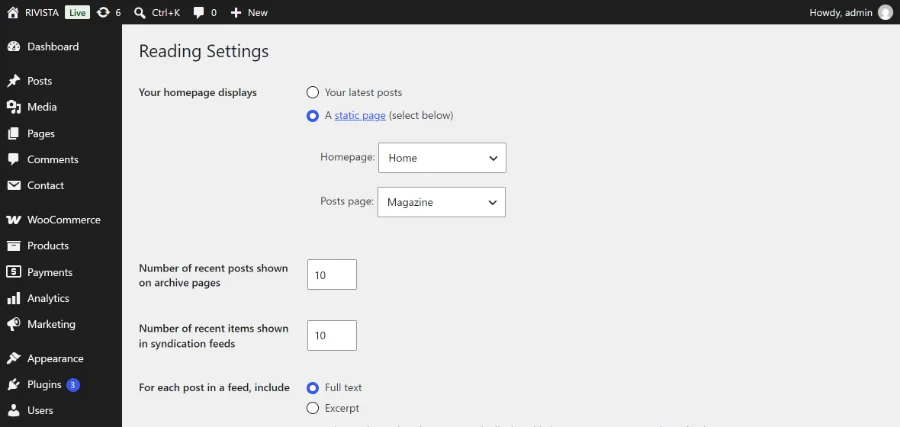
Site title, tagline and logo
Go to Appearance → Customize → Site Identity. Upload a logo (the theme suggests 200 × 50 px and accepts flexible sizes); without one, the site title is used as the wordmark. The site description is shown as the eyebrow above the footer newsletter band, so keep it short.
Menus and their locations
Menus live under Appearance → Menus. The theme registers eight locations:
| Location | Where it appears |
|---|---|
| Primary Menu | The desktop header. |
| Mobile Menu | The slide-in menu on phones and tablets. |
| Footer Column 1–4 | The four footer columns, under the fixed headings Shop, Discover, Studio and Help. |
| Social Links | Social icons. Each item’s URL is recognised automatically and replaced with an inline SVG icon — Instagram, Facebook, X/Twitter, YouTube, TikTok, Pinterest, LinkedIn, WhatsApp, Telegram and mailto: links are detected; anything else gets a generic link icon. The link text stays as screen-reader text, so keep it descriptive. |
| Legal Links | The small print row at the very bottom. |
Empty locations simply do not render. The Social location is the one the demo leaves for you: create a menu of custom links to your profiles and assign it there.
WooCommerce pages, currency and tax
Check WooCommerce → Settings → Advanced — Cart, Checkout, My account and Terms should point at the imported pages. The import sets Shop, Cart, Checkout and My account for you.
Set your country, currency and currency position under WooCommerce → Settings → General. Demo prices are plain numbers, so they pick up the new currency immediately.
Configure tax under WooCommerce → Settings → Tax if you charge it.
The ticker text is written once, at import time, using the currency your store had then. If you change currency afterwards, edit the text yourself in Appearance → Customize → RIVISTA Settings → Header Settings → Announcement text.
Shipping — and the free-shipping chip
Set your zones and rates under WooCommerce → Settings → Shipping. One setting feeds the front end directly:
Open a shipping zone and choose Add shipping method → Free shipping.
Edit the method and pick a requirement such as A minimum order amount, then enter the amount.
The homepage chip strip reads that configuration and shows “Free shipping over <amount>” in your store currency. With a Free shipping method but no minimum it shows simply “Free shipping”; with no Free shipping method anywhere, no free-shipping chip is shown at all. Nothing is invented.
The free-shipping progress bar inside the mini-cart drawer reads the smallest minimum order amount among your enabled Free shipping methods, so it lines up with the chip on its own — there is nothing to keep in sync. A store with no free-shipping method shows no meter. Use the rivista_free_shipping_threshold filter (section 11) only when you want to override that figure, or return 0 to hide the meter entirely.
Payments
Add gateways under WooCommerce → Settings → Payments and place one real test order end to end — cart, checkout, order received, and the order inside My account → Orders. All four screens are styled by the theme, so this is the fastest way to confirm everything is wired up.
Pre-launch checklist
Choose the homepage, colour pack and font pairing.
Upload the logo and write the tagline.
Replace demo products and photography with your own.
Finish shipping, tax and payments; place a test order.
Write the Privacy, Terms and Shipping & Returns pages.
Build the Social menu; review all seven menus.
Replace the static demo contact form with a real Contact Form 7 form and set its mail addresses.
Delete the six theme-showcase pages listed in section 04.
Set the announcement text, or clear it to hide the ticker.
Turn the style switcher off (it already is) before going live.
Homepage demos.
Twenty demo homepages arrive with the import, alongside the theme’s own live editorial front page. They are ordinary WordPress pages, so switching between them takes one setting and no rebuild.
The built-in editorial home
“Outfit of the day” is rendered in PHP from your real catalogue: a hero look carousel built from WooCommerce products, category tiles with live product counts, the chip strip (section 11), a product grid, an editorial teaser and the shared values and newsletter bands. It is the default front page, and it is also available as the page template Editorial Home so you can put it on any page. The imported Home page uses it.
Switching the homepage
Open Settings → Reading.
Select A static page and choose your demo in the Homepage dropdown.
Save. The page keeps its own layout, styles and scripts — a demo looks the same as the front page as it did as an inner page.
The twenty layouts
index-home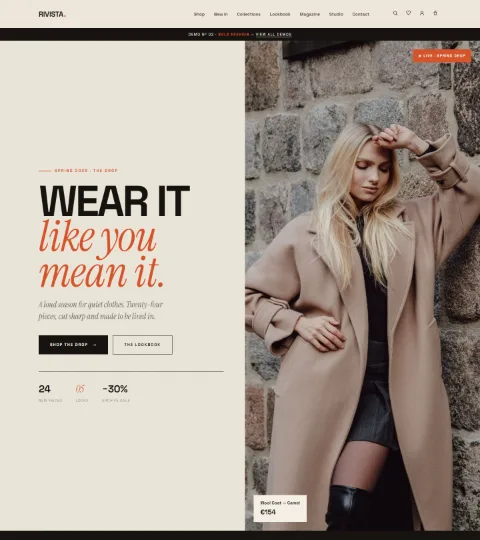
index-bold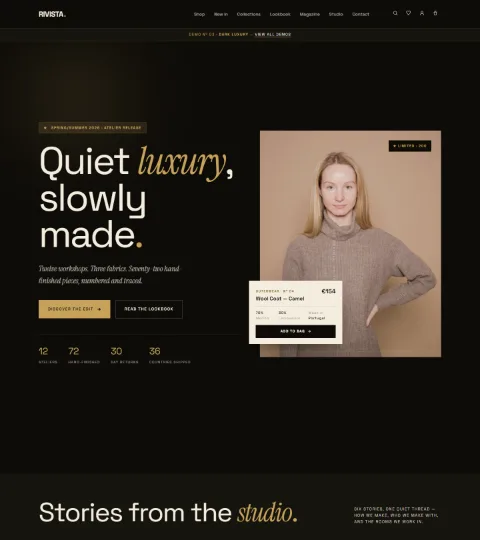
index-dark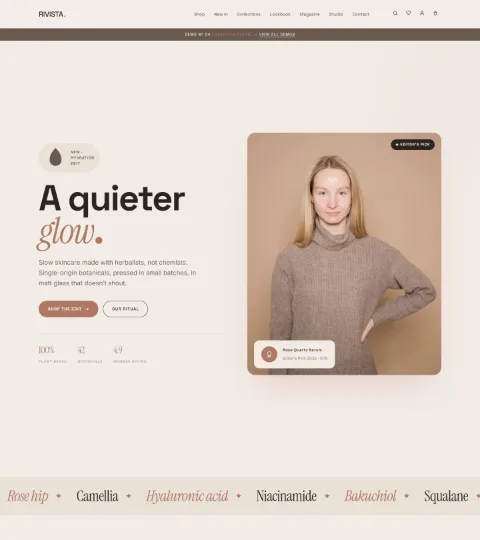
index-beauty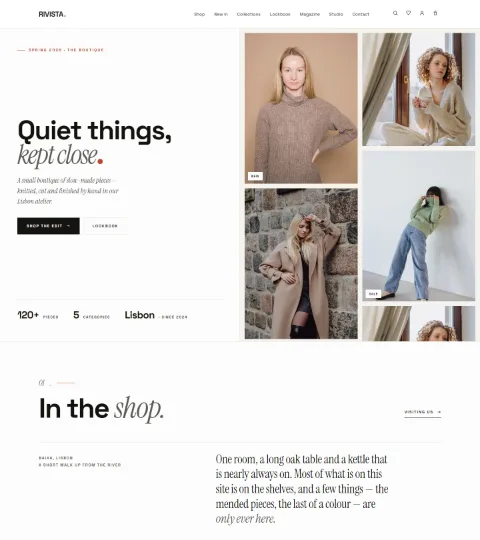
index-boutique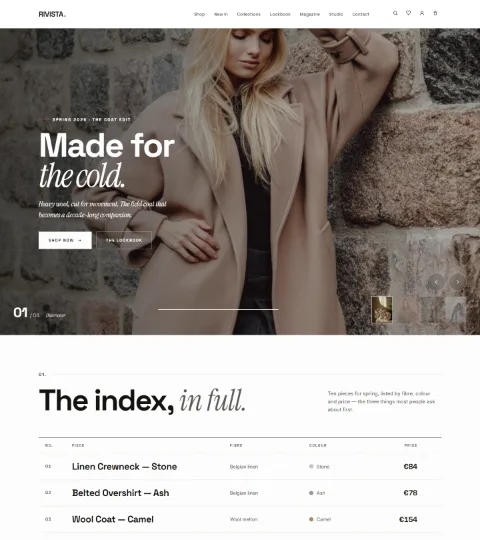
index-showcase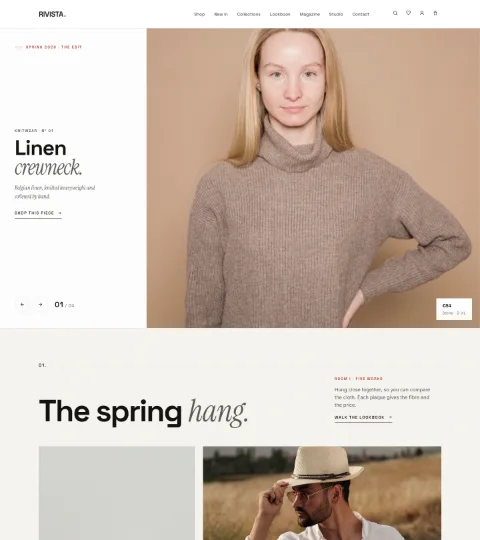
index-gallery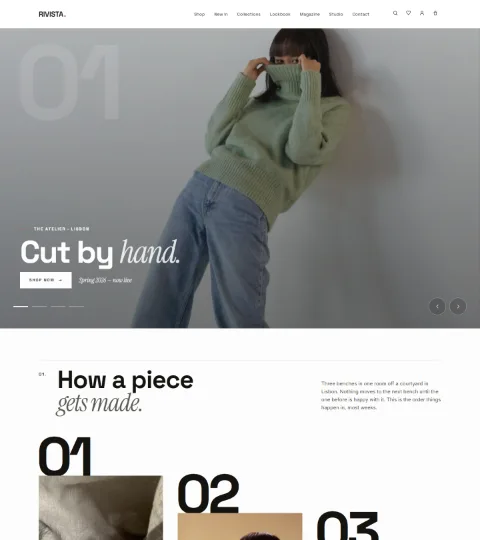
index-atelier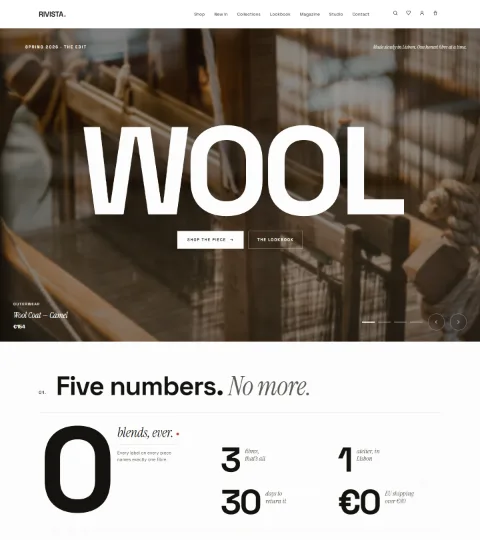
index-kinetic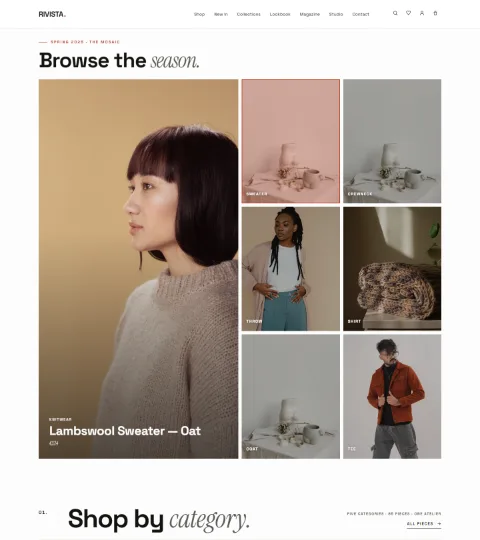
index-mosaic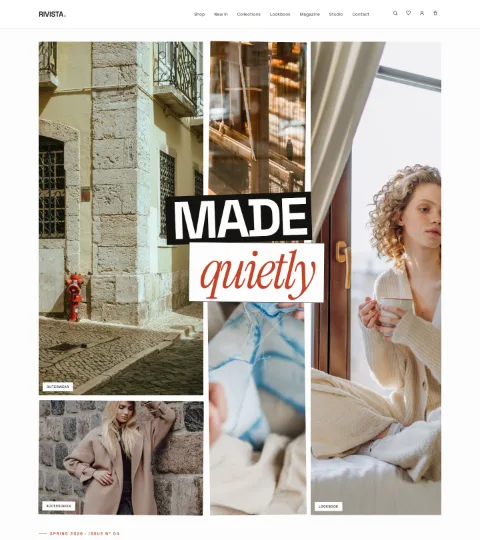
index-collage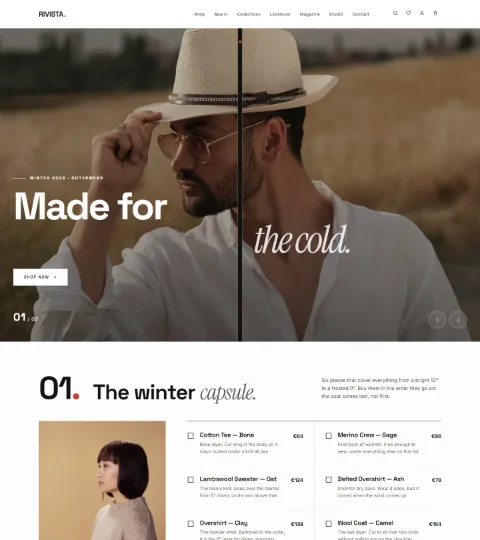
index-curtain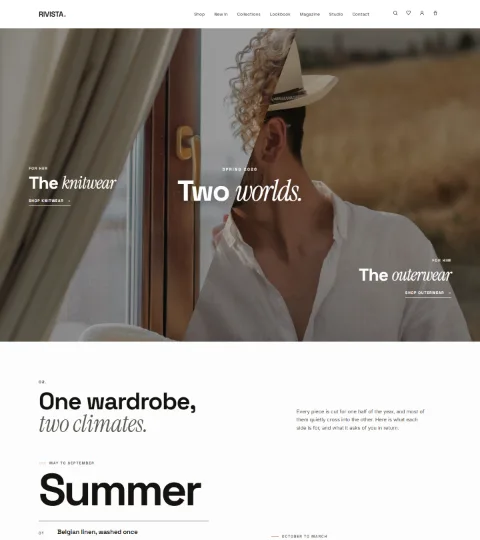
index-diagonal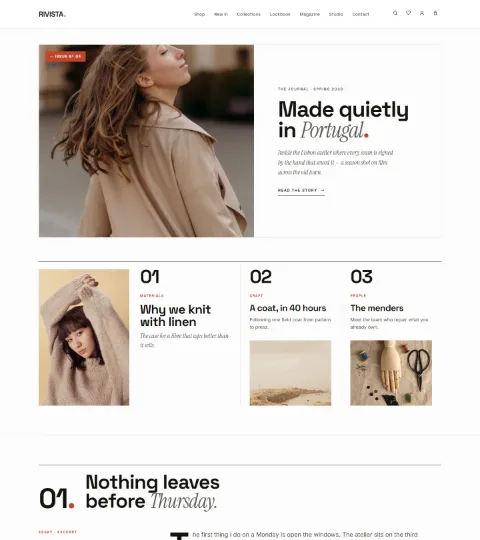
index-journal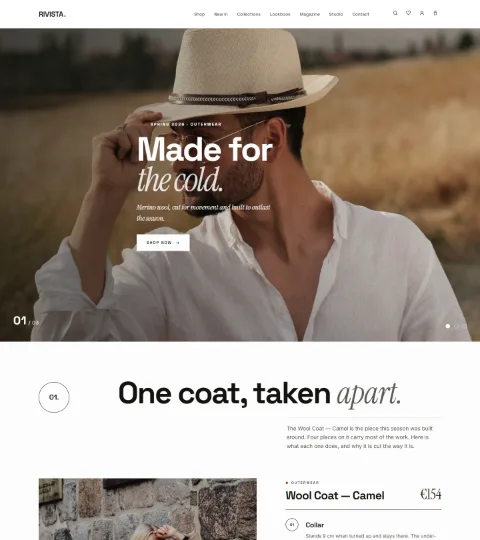
index-reveal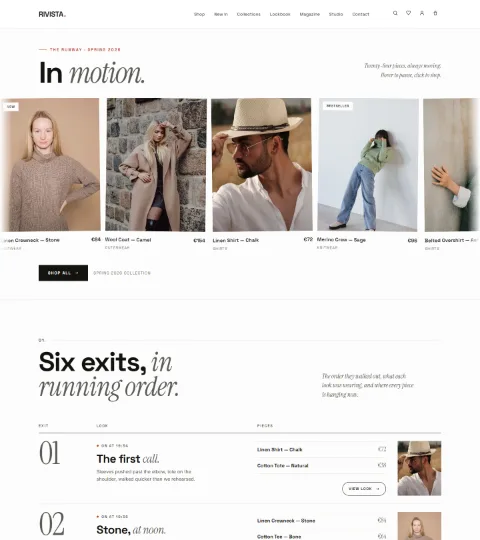
index-runway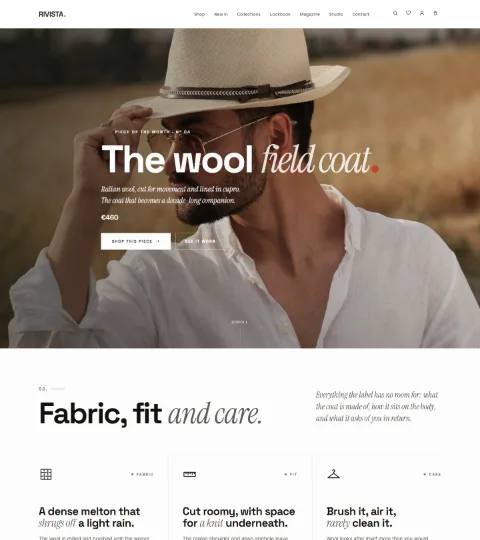
index-spotlight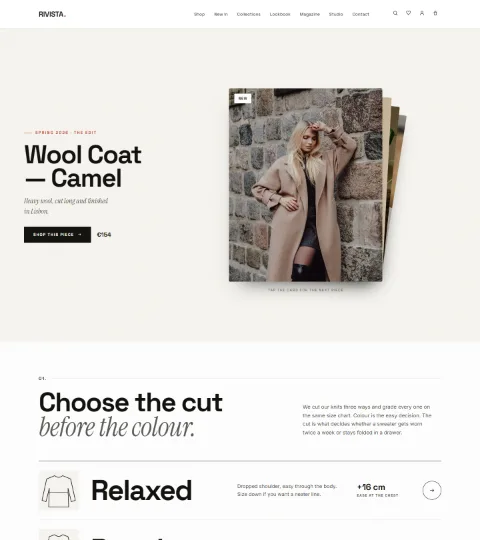
index-stack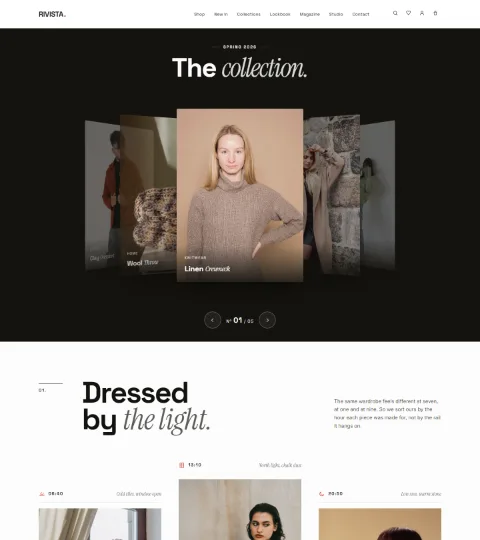
index-tilt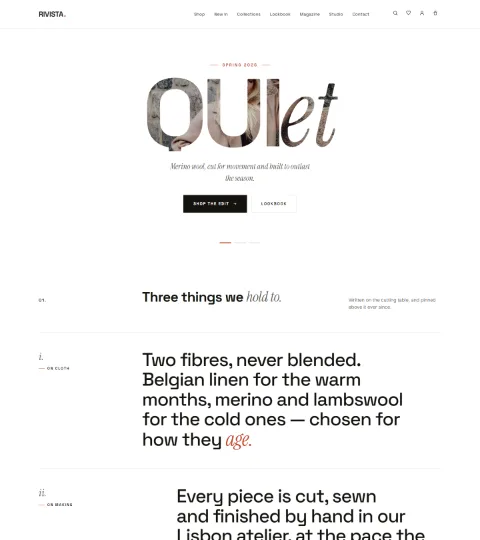
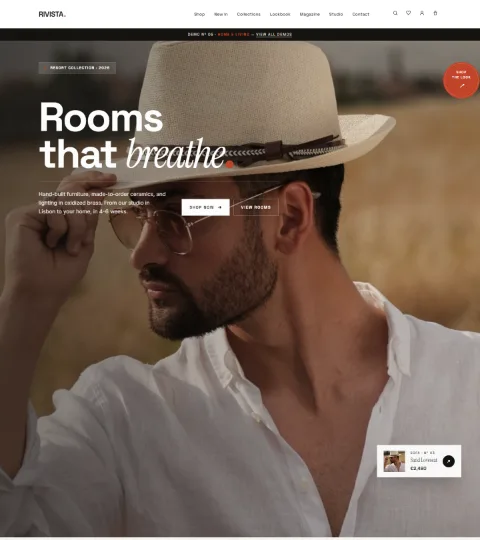
index-typoEach thumbnail is the top of that demo as the import builds it, on a 1440 px screen. Preview any of them at /index-<name>/.
| Nº | Demo | Page slug | Character |
|---|---|---|---|
| 01 | Editorial — Quiet | index-home | Restrained magazine grid, generous white space. |
| 02 | Bold — Fashion | index-bold | Oversized type, high-contrast blocks. |
| 03 | Dark — Luxury | index-dark | Dark canvas with a newsletter band. |
| 04 | Beauty — Pastel | index-beauty | Soft palette, product-led. |
| 05 | Boutique — Living | index-boutique | Interiors and homeware feel. |
| 06 | Showcase — Slider | index-showcase | Full-bleed slider hero. |
| 07 | Gallery — Slider | index-gallery | Gallery-style sliding frames. |
| 08 | Atelier — Slider | index-atelier | Studio narrative with the journal block. |
| 09 | Kinetic — Motion | index-kinetic | Motion-led, type in movement. |
| 10 | Mosaic — Grid | index-mosaic | Dense grid for large catalogues. |
| 11 | Collage — Editorial | index-collage | Overlapping editorial collage. |
| 12 | Curtain — Reveal | index-curtain | Curtain reveal on scroll. |
| 13 | Diagonal — Dynamic | index-diagonal | Angled sections with a live product block. |
| 14 | Journal — Magazine | index-journal | Content-first, for brands that publish. |
| 15 | Reveal — Scroll | index-reveal | Scroll-driven reveals. |
| 16 | Runway — Fashion | index-runway | Runway pacing with a live product block. |
| 17 | Spotlight — Focus | index-spotlight | One hero product in focus. |
| 18 | Stack — Layered | index-stack | Stacked, layered panels. |
| 19 | Tilt — 3D | index-tilt | Tilting cards with a newsletter band. |
| 20 | Typo — Type | index-typo | Typographic, image-light. |
Each layout page carries a hidden marker that tells the theme which stylesheet and script to load. A page you create by hand with the RIVISTA Demo Full Width template has no marker, so it gets the generic page styling. To build on a demo, duplicate the existing page with a duplicator plugin (which copies the marker) rather than starting from an empty one.
Pages guide.
Seventy-two pages arrive with the demo. Some are live — they read your real data. The rest are hand-built editorial layouts you edit like any other page.
Live reads real WordPress or WooCommerce data. Layout is demo copy stored in the page content: edit the text, prices and names directly in the editor.
Page templates
The theme registers exactly two page templates, selectable in the editor under Page → Template:
| Template | What it does |
|---|---|
| RIVISTA Demo Full Width | A full-width wrapper that prints the page content untouched, so bundled HTML layouts survive. Used by 66 of the imported pages. |
| Editorial Home | Renders the built-in “Outfit of the day” homepage on any page. |
Shop & commerce
| Page | Slug | Type | What it is |
|---|---|---|---|
| Shop | shop | Live | The WooCommerce archive, rendered by the theme’s editorial shop template. |
| Cart | cart | Live | WooCommerce Cart block, fully restyled. |
| Checkout | checkout | Live | WooCommerce Checkout block, fully restyled. |
| My account | my-account | Live | The real account area, styled throughout. |
| Wishlist | wishlist | Live | Renders the shopper’s saved products, with a share link, add-all-to-bag and suggestions. |
| Compare | compare | Live | A real comparison table of the selected products. |
| Collections | collections | Layout | Editorial grid of categories. |
| Category | category | Layout | Category landing design. |
| Shop List | shop-list | Layout | List view with a filter sidebar design. |
| Product Editorial | product-editorial | Layout | Magazine-style product story. |
| Shop The Look | shop-the-look | Layout | Interactive bundle builder. |
| Gift Cards | gift-card | Layout | Gift-card designer. It does not issue a real gift card — pair it with a gift-card plugin. |
| Fit Finder | fit-finder | Layout | Size quiz. |
| Confirmation | confirmation | Layout | Thank-you design. The real one is WooCommerce’s order-received page. |
Account
Six designed account screens — account, account-orders, account-order, account-addresses, account-settings and sign-in — all Layout. They exist so you can show a branded account experience and style-match plugins. The functional account area is my-account.
Editorial & content
| Page | Slug | Type | What it is |
|---|---|---|---|
| Magazine | magazine | Live | The journal index with its masthead; your posts page. |
| Lookbook | lookbook | Layout | Seasonal looks. The shop archive links to it from its story tile. |
| Lookbook Interactive | lookbook-interactive | Layout | Shoppable hotspots over photography. |
| Style Quiz | style-quiz | Layout | Preference quiz. |
| Archive | archive | Layout | Past-seasons timeline. |
| Events | events | Layout | Workshops and dates. |
| Drops | drops | Layout | Countdown and waitlist design. |
| Members | members | Layout | Loyalty tiers. |
| Makers | makers | Layout | Maker and workshop profiles. |
Company, help and legal
- Company —
about(Studio),sustainability(Our Materials),stores,careers,press. - Help —
faq,shipping-returns,size-guide,contact,order-tracking. The order-tracking page looks up sample order numbers for demonstration; it does not query WooCommerce orders, so replace it with WooCommerce’s own order-tracking form or a tracking plugin. - Legal —
privacy,terms. Both hold placeholder copy. Write your own before launch.
Utility, system and showcase
searchis a designed results page; real search results are rendered by the theme’s own search template at?s=.coming-soon,sliders(twelve slider patterns) andelements(the style guide: colours, type and components) are reference pages —elementsis genuinely useful while you customise.presentation,demos,all-pages,map,promoanddocumentationdescribe the theme, not your store. Delete them before launch.
Layout pages are markup stored in the page content. Edit them in the block editor’s Code editor view (Options → Code editor), or edit only the visible text in the visual view. Keep the wrapper elements and their classes — they carry the styling.
Customizer reference.
Every theme option lives in one panel: Appearance → Customize → RIVISTA Settings. There is no separate options page, and nothing is hidden behind a licence key.
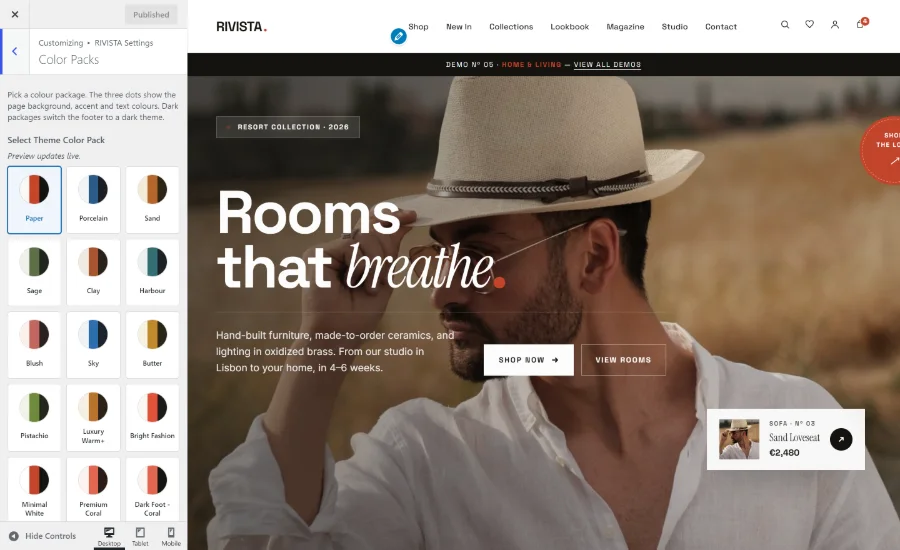
| Section | Setting | Default | What it does |
|---|---|---|---|
| Color Packs | Select Theme Color Pack | Paper | Swatch grid of 22 packages. The three dots on each swatch show the page background, accent and text colour. The preview updates the moment you pick a pack. |
| Color Packs | Show the style switcher to visitors | Off | Adds a floating panel where visitors try packs, typefaces and light/dark on their own device. Meant for demo sites; leave it off on a live store. |
| Typography | Font pairing | Contemporary | Five site-wide pairings for headings, body and italic accents. |
| Header Settings | Header Style | Standard | Standard, Centered, Minimal Overlay or Block. |
| Header Settings | Site layout direction | Automatic | Sets the public site’s direction independently of the dashboard language. |
| Header Settings | Announcement text | Empty | Any text here renders the scrolling ticker above the header. Clear it to remove the ticker. |
| Footer Settings | Newsletter form shortcode | Empty | Paste a shortcode from Contact Form 7 or another form plugin to render the footer newsletter band. Empty hides the whole band. |
Colour packs
All 22 packages, grouped by how they treat the footer:
Light packs
- Paper (default)
- Porcelain
- Sand
- Sage
- Clay
- Harbour
- Blush
- Sky
- Butter
- Pistachio
- Luxury Warm+
- Bright Fashion
- Minimal White
- Premium Coral
Light page, dark footer
- Dark Foot — Coral
- Dark Foot — Olive
- Dark Foot — Sky
- Dark Foot — Plum
- Dark Foot — Gold
- Dark Foot — Teal
Fully dark
- Midnight
- Forest
A pack sets the page background, accent and ink colour for the whole site. Individual demo pages that are designed dark stay dark under any pack.
Typography
| Pairing | Display / Italic / Body |
|---|---|
| Contemporary (default) | Space Grotesk / Instrument Serif / Inter — the three bundled typefaces. |
| Editorial Serif | Playfair Display with a Georgia fallback. Playfair is not bundled and no font service is called, so visitors without it locally see Georgia. |
| Modern Grotesque | Space Grotesk headings, Georgia italics, Inter body. |
| Classic Serif | Georgia throughout. |
| System UI | The visitor’s own interface font, Georgia for italics. The fastest option. |
Header styles
Layout direction
Automatic follows the site language and switches to right-to-left for Arabic, Persian, Hebrew and Urdu. Left to right and Right to left force the public site regardless of the dashboard language, which is what you want when you administer an RTL store in English. See section 13.
Announcement bar
Whatever you type is announced politely to screen readers and scrolls as a ticker. Separate messages with a pipe, exactly as the import does: Free shipping over $80 | New drop every Thursday | 30-day easy returns. Keep it plain text. (The import writes that first message only when your store really offers free shipping — section 04.)
Newsletter band in the footer
Build a form in Contact Form 7 (or your mailing provider’s plugin), copy its shortcode, and paste it into RIVISTA Settings → Footer Settings → Newsletter form shortcode. The band then shows your tagline as an eyebrow, the site name as a wordmark, and your form. Leave the field empty and the band disappears entirely.
The style switcher
Turned on, a floating button opens a panel where visitors try all 22 colour packs, four typefaces and light or dark mode. Choices are stored in that visitor’s own browser only and never change your site for anyone else.
It is off by default, and it is meant for demo and portfolio sites. On a real shop it distracts from the products and lets visitors see a palette you did not design for.
WordPress settings the theme uses
Outside the RIVISTA panel, these core Customizer sections matter: Site Identity (logo, title, tagline, site icon), Background, Menus, Widgets (one area, Footer Widgets, shown above the footer navigation), Homepage Settings and Additional CSS for small tweaks.
WooCommerce features.
The storefront is WooCommerce, re-drawn. Every feature below works with the plugin alone — no extensions, no accounts, no external service.
Shop archive
- Editorial header with the result count set as a serif superscript beside the title.
- A row of category tabs with live product counts, plus WooCommerce’s sorting select and result count.
- An optional full-width “story” tile woven into the grid after the fourth product, linking to your lookbook. It appears on page one of the main shop only, and only when that page lists at least eight products and a published Lookbook page exists.
- Hairline pagination, or an end-of-collection line that points to the collections page.
Product cards
Used on the shop, category archives, related products, upsells and cross-sells: a 4:5 photograph, badges for Sold out, Sale and “Only N left” when stock is managed and low, a hover stack of wishlist / compare / quick-view buttons, the title, price, category and star rating. The real WooCommerce add-to-cart link sits over the photograph, so AJAX add-to-cart and cart fragments keep working. Simple, purchasable, in-stock products read Add to bag; every other product type keeps WooCommerce’s own wording.
Product page
- WooCommerce’s own gallery with zoom, lightbox and a thumbnail slider — images you add under Product gallery appear automatically.
- The title splits on an em dash, so “Linen Crewneck — Stone” sets the colour in serif italic.
- Price with a computed discount label, star rating (or an invitation to write the first review), short description and the real add-to-cart form for every product type.
- A quantity stepper that respects the product’s minimum, maximum and step values.
- An expandable block of store guarantees — editable through a filter (section 11).
- SKU, categories and tags; the standard Description / Additional information / Reviews tabs; upsells; and the theme’s own “Pair with” block, which shows related products and tops the row up when there are fewer than four.
- A sticky add-to-bag bar that slides in once the buy box scrolls out of view.
- Variable products get a styled attribute picker.
Wishlist
Every card and product page carries a heart. Saved products live in the visitor’s browser — no account, no plugin, nothing stored on your server — and the header shows a live count. The wishlist page renders the real products with prices, a running total, a share link, add-all-to-bag and four suggestions.
Compare
Shoppers can compare up to four products. A sticky tray follows them around the site (a full row on desktop, a “Compare · N” pill on phones that expands on tap and closes with Esc), staying in sync across browser tabs. The tray hides itself on cart, checkout, account and order pages. The compare page builds a real table — price, rating, availability, category, SKU and one row per product attribute — with a switch to highlight only the differences.
Quick view and quick add
The eye icon opens a modal with the product image, category, title, rating, short description, price, a working add-to-cart and a link to the full page. It traps focus and closes with Esc. The plus icon on a card adds a simple product straight to the bag and flips to a tick.
Mini-cart drawer
The header cart button opens a drawer containing WooCommerce’s own mini-cart, refreshed through cart fragments. The theme adds a free-shipping progress meter, a quantity stepper on each line, a clean subtotal row and the note that shipping and taxes are calculated at checkout.
Cart, checkout and orders
The demo cart and checkout pages use the WooCommerce Cart and Checkout blocks, restyled in detail: line items, quantity pills, the coupon field, the order summary, express payment buttons and the phone checkout flow. The empty cart gets its own heading and a “Continue shopping” button. Classic shortcode cart and checkout pages still work and inherit the shared styling. The order-received page and My account → View order are styled too, with the grand total picked out.
Compatibility with other plugins
All shop templates fire the standard WooCommerce hooks — woocommerce_before_main_content, the shop-loop hooks, woocommerce_single_product_summary and the rest — so badge, size-chart, wishlist and review plugins hook in where they expect to. The callbacks the theme draws itself are unhooked in one place, rivista_wc_hook_layout() in inc/commerce-features.php, which a child theme can re-add or reorder.
Recently-viewed products, a product-page size-guide modal, colour/image variation swatches, product filters or live search, a currency switcher, and order tracking against real WooCommerce orders are not part of the theme. Add a plugin for any of these; the theme’s styling is deliberately neutral so they fit in.
Elementor & RIVISTA Core.
The Elementor integration lives in a companion plugin, not in the theme, so your content keeps working if you ever change themes.
Install RIVISTA Core from Appearance → Install Plugins. It ships inside the theme, so nothing is downloaded.
Install and activate Elementor.
Edit any page with Elementor and look in the Basic widget category.
| Widget | Controls | Notes |
|---|---|---|
| RIVISTA Hero | Eyebrow, title, image, button text, button link | An editorial hero block. The link field accepts Elementor dynamic tags. |
| RIVISTA Marquee | Marquee text | The text repeats in a scrolling track. |
| RIVISTA Product Rail | Number of products (1–12, default 4) | Shows your latest published products with image, name and price. Renders nothing without WooCommerce, and says so when the catalogue is empty. |
Beyond the widgets, the only other thing the plugin ships is the four section shortcodes of section 11 — the tags, the render code behind them, and a small base stylesheet that keeps the sections presentable under other themes — no post types, no settings screen, no demo content. It carries its own translation template at languages/rivista-core.pot with the text domain rivista-core, and its own right-to-left stylesheet.
The demo content contains no Elementor data at all. You can run the entire demo site, and the whole theme, without ever installing Elementor.
Filters, chips & developer notes.
Everything below belongs in a child theme’s functions.php (section 12) or a small site plugin — never in the parent theme, which an update will overwrite.
Filters the theme provides
Eleven filters, and that is the whole list: RIVISTA fires no custom actions of its own, so anything else you want to move sits on a WordPress or WooCommerce hook. The file under each name is where the filter runs, in case you want to read the surrounding code.
| Filter | Default | Controls |
|---|---|---|
rivista_home_chipsfront-page.php | Store-honest chips, built from your real settings and pages | The chip strip on the built-in homepage. See below. |
rivista_free_shipping_thresholdinc/commerce-features.php | The smallest minimum order amount among the store’s enabled WooCommerce free-shipping methods; 0 (meter hidden) when the store has none | The free-shipping meter in the mini-cart drawer. Return 0 or less to remove the meter. |
rivista_trust_badgesinc/commerce-features.php | Secure checkout · Free shipping · 30-day returns | The store guarantees. Each item is an array of icon, title, sub and, on the product page, url. Valid icons: shield, truck, refresh, heart, compare, eye, check, close. The product page registers its own defaults at priority 1, so hook at priority 10 or later to win. |
rivista_shipping_returns_urlwoocommerce/single-product.php | The permalink of a published shipping-returns page, or an empty string when there is none | The policy link inside the product-page guarantees. An empty string prints the rows without links. |
rivista_shop_storywoocommerce/archive-product.php | Image, headline, text and a link to the Lookbook page — but only on page one of the main shop, only when that page lists at least eight products, and only when a published lookbook page exists. An empty array otherwise | The editorial story tile inside the shop grid. Return an empty array to remove it, or a full array to force it on. |
rivista_home_model_shotsfront-page.php | Four bundled photographs | The hero photographs on the built-in homepage, as file names inside demo-content/media/2026/06/. |
rivista_home_season_labelfront-page.php | The Edit | The kicker above the homepage hero, repeated on the editorial badge lower down. Kept deliberately seasonless so the homepage never freezes on one collection; dates on the page are printed live. Plain text — tags are stripped. |
rivista_home_editorial_textfront-page.php | A neutral paragraph about the studio reviewing every product | The teaser copy in the editorial band on the built-in homepage. Plain text. |
rivista_mega_feature_headingtemplate-parts/header/site-header.php | The new collection. | The heading on the feature card inside the header mega-menu. Seasonless by default, for the same reason as the homepage kicker. |
rivista_content_widthinc/theme-setup.php | 1200 | WordPress’s $content_width, set on after_setup_theme. |
rivista_hide_compare_barinc/commerce-features.php | true on cart, checkout, account and the order-received, order-pay and view-order endpoints; false everywhere else | Whether the sticky compare tray is suppressed on the current view. |
The homepage chip strip
The row of chips under the homepage hero is a filterable array. Each chip is an array with:
labelurlstylesky, butter, ink, rose or outline.The defaults are built to be true for any store, not just the demo:
- A free-shipping chip built from your real WooCommerce settings: “Free shipping over <amount>” in your store currency when a Free shipping method with a minimum order amount exists, “Free shipping” when one exists without a minimum, and no chip at all when your store offers no free shipping.
- Chips that link to real pages the demo import creates — the shipping & returns page, the size guide, gift cards, and the journal article about mending — each shown only when that page or post actually exists on your site. Each label is the page’s own title, so renaming the page renames the chip.
Nothing is claimed that your store has not been configured to do. Add, remove or replace chips with the filter:
<?php
add_filter( 'rivista_home_chips', function ( $chips ) {

    // Add one chip that links to a page.
    $chips[] = array(
        'label' => __( 'Made in our own studio', 'rivista-child' ),
        'url'   => home_url( '/about/' ),
        'style' => 'outline',
    );

    // Or replace the whole strip:
    // $chips = array(
    //     array( 'label' => 'Complimentary gift wrapping', 'style' => 'butter' ),
    //     array( 'label' => 'Ships in 24 hours',          'style' => 'ink' ),
    // );

    return $chips;
} );
The homepage hero tags
The hero carousel shows up to four looks, taken from the first products in your catalogue (menu order, then newest) that have a featured image. It prints one tag per look in the bottom bar and highlights the tag belonging to the look on screen, so no two tags may read the same. Each label is therefore the look’s first product category — ignoring the store’s default category — if no earlier look has used it; otherwise the product name shortened to the part before the em dash; and if that still collides, the full product name. Nothing to configure: rename a category or a product and the tags follow.
Overriding the mini-cart meter
The meter already reads the smallest minimum order amount among your enabled WooCommerce free-shipping methods, and hides itself when the store has none — so most shops never touch this. Use the filter when you want a different figure from the one in your shipping zone.
<?php
// The number is in store currency, with no symbol. Return 0 to hide the meter.
add_filter( 'rivista_free_shipping_threshold', function () {
    return 120;
} );
Rewriting the store guarantees
<?php
add_filter( 'rivista_trust_badges', function () {
    return array(
        array(
            'icon'  => 'truck',
            'title' => __( 'Free UK delivery', 'rivista-child' ),
            'sub'   => __( 'On orders over 75', 'rivista-child' ),
            'url'   => home_url( '/shipping-returns/' ),
        ),
        array(
            'icon'  => 'refresh',
            'title' => __( '30-day returns', 'rivista-child' ),
            'sub'   => __( 'No questions asked', 'rivista-child' ),
        ),
    );
}, 20 );
Section shortcodes
Four ready-made bands can be dropped into any page or post, and are used by several demo layouts. Both the tags and the sections’ render code live in the bundled RIVISTA Core plugin (section 10), so the content keeps rendering even if you later switch themes — under a foreign theme the plugin adds a small base stylesheet, while RIVISTA styles the sections in full. The theme’s front page draws its values and newsletter bands through the same plugin functions, so keep the plugin active; without it those two bands are simply omitted. They are shortcodes, not blocks — there is nothing to find in the block inserter under a RIVISTA heading. Add them with the editor’s Shortcode block, or simply type them into the content. Add tone="dark" to any of them on a dark page.
| Shortcode | Attributes | Renders |
|---|---|---|
[rivista_products] | limit (4), eyebrow, title, tone | Your latest products as editorial cards. |
[rivista_journal] | limit (3), eyebrow, title, tone | Your latest journal posts. |
[rivista_values] | items, tone | A marquee of promises. Separate items with | and mark the italic part with ~, e.g. items="Made~slowly|Packed~by hand". |
[rivista_newsletter] | eyebrow, title, text, action, tone | A subscribe band. Without an action URL it only shows a confirmation message, so point it at your mailing provider’s endpoint — the field is posted as email. |
Other things worth knowing
- AJAX actions (front end, logged in or out, all nonce-checked):
rivista_quick_view,rivista_wishlist_items,rivista_compare_items,rivista_compare_bar,rivista_set_cart_qty. - Pluggable functions a child theme can redefine:
rivista_setup(),rivista_posted_on(),rivista_posted_by(),rivista_entry_footer(),rivista_post_thumbnail(). - Theme mods behind the Customizer panel, readable with
get_theme_mod():rivista_premium_pack,rivista_style_switcher,rivista_font_pack,rivista_header_style,rivista_layout_direction,rivista_announcement_text,rivista_newsletter_shortcode. - Browser storage (all local to the visitor):
rivista-wishlist,rivista-compare,rivista-compare-meta,rivista-pack,rivista-type,rivista-theme,rivista-newsletter-subscribed, plus two session keys for the preloader and the newsletter popup. - Image sizes: the theme registers none of its own and uses WordPress and WooCommerce sizes, so WooCommerce’s image settings under Appearance → Customize → WooCommerce → Product Images control the catalogue crop.
- Editor extras: a “RIVISTA Frame” block style for the Image block and an “Editorial Introduction” block pattern.
Child theme.
No child theme is bundled, because a good one is six lines long and belongs to your project. Create it before you change any PHP or CSS — edits to the parent theme are lost on the next update.
Create the folder
wp-content/themes/rivista-child/.Add
style.csswith the header below.Add
functions.phpwith the enqueue block below.Add an empty
custom.cssfor your own rules.Activate RIVISTA Child under Appearance → Themes.
rivista-child/style.css
/*
Theme Name: RIVISTA Child
Template: rivista
Version: 1.0.0
Text Domain: rivista-child
*/
rivista-child/functions.php
<?php
add_action( 'wp_enqueue_scripts', function () {

    // The parent's style.css is enqueued as get_stylesheet_uri(), which points at
    // the CHILD once a child theme is active, so load the parent sheet explicitly.
    wp_enqueue_style(
        'rivista-parent-style',
        get_template_directory_uri() . '/style.css',
        array(),
        wp_get_theme( 'rivista' )->get( 'Version' )
    );
    wp_style_add_data( 'rivista-parent-style', 'rtl', 'replace' );

    // Put your own rules in a separate file that depends on the LAST theme sheet,
    // otherwise the theme's own stylesheets win the cascade.
    wp_enqueue_style(
        'rivista-child-custom',
        get_stylesheet_directory_uri() . '/custom.css',
        array( 'rivista-custom-cards' ),
        '1.0.0'
    );
}, 20 );
What a child theme can and cannot override
- Templates and the
woocommerce/overrides can be copied into the child and edited normally — keep the same file names. - The child’s own
style.cssloads automatically, but before the theme’s main stylesheets, so rules there lose at equal specificity. Use the extracustom.cssabove. - Demo media and the Customizer control assets are child-overridable; the shared CSS and JavaScript always load from the parent.
rivista_setup()and the four template tags are pluggable, so a child can replace them wholesale.
The import resets page templates that do not exist in the active theme folder. If your child copies templates, keep the original file names; otherwise import the demo while the parent theme is active and switch to the child afterwards.
RTL & translation.
Every user-facing string in the theme’s PHP is translatable, and every stylesheet ships a mirrored right-to-left twin.
Translating the theme
rivista for the theme, rivista-core for the companion plugin.languages/rivista.pot inside the theme — 344 translatable entries in version 1.4.0 (342 unique strings; a couple repeat under a translator context). Poedit and Loco Translate always report the count for the copy in front of you. The plugin’s template is languages/rivista-core.pot.rivista-<locale>.po / .mo — for example rivista-fr_FR.mo. Put them in wp-content/languages/themes/ so that theme updates cannot overwrite them.With Loco Translate (in the dashboard)
Install Loco Translate and open Loco Translate → Themes → RIVISTA.
Press New language, pick your locale, and choose the location “Custom” (
languages/themes/) rather than the theme folder.Translate the strings and press Save. Loco compiles the
.mofile for you.Repeat for the RIVISTA Core plugin if you use the Elementor widgets.
With Poedit (on your computer)
Open
languages/rivista.potin Poedit and choose Create new translation.Select the language and translate.
Save as
rivista-<locale>.po; Poedit writes the matching.mobeside it.Upload both files to
wp-content/languages/themes/.
Right-to-left layouts
Set the site language to an RTL locale under Settings → General, and WordPress swaps in the mirrored stylesheet for every theme sheet automatically — the main styles, the shared styles, the commerce styles and all 72 per-page stylesheets each ship an -rtl.css twin. On top of that the theme keeps prices, SKUs, counters and the wordmark reading left to right, and flips directional arrows.
The import sets the layout direction to Left to right. Change it back under Appearance → Customize → RIVISTA Settings → Header Settings → Site layout direction — choose Automatic to follow the site language, or Right to left to force it.
Because direction is applied on the public site only, you can keep the dashboard in one language and run the storefront in another. If you edit the parent theme’s stylesheets directly, regenerate the mirrors with npm install once and then npm run build:rtl; hand-written RTL corrections belong in assets/css/_rtl.css. Working in a child theme, you do not need to regenerate anything.
A few pieces of front-end copy are written into JavaScript and demo content rather than PHP: the preloader wordmark and its lines, the newsletter pop-up copy and its success message, the demo newsletter confirmation, the mobile submenu toggle label, and all imported demo page content, which is English. Edit the demo pages in the editor, and adjust the rest in a child theme if you need them in another language.
Performance & privacy.
The theme makes no outbound requests. What your visitors load comes from your own server, which is good for speed and simple for privacy law.
Self-hosted fonts
Space Grotesk, Instrument Serif and Inter ship as WOFF2 files inside the theme and are declared with font-display: swap. No Google Fonts request is ever made, so no visitor IP address is shared with a font service.
No third-party assets
No CDN, no analytics, no tracking pixel, no remote script or stylesheet of any kind. The only external URLs in the front end are the social share links a visitor chooses to click.
Conditional loading
Per-page styles and scripts load only on the page that needs them; WooCommerce styles load only where WooCommerce is being shown, and only when the plugin is active. Every file is versioned by its modification time, so browser caches refresh on update.
No JavaScript libraries
Sliders, reveals, the mega menu, the compare tray and the mini-cart are plain JavaScript — no animation framework, no slider plugin. Reduced-motion preferences are respected by the preloader, the reveals and every autoplay slider.
Data the front end stores
Wishlist, compare list, style-switcher choices and the “newsletter pop-up already seen” flag are kept in the visitor’s own browser storage. Nothing is sent to your server or to anyone else, and clearing site data removes it all. WooCommerce’s own cookies and any plugins you add are of course governed by their own policies — describe them in your privacy page.
The contact, sign-in, gift-card, drops and newsletter forms inside the demo page content are front-end designs: they show a confirmation and stop there. Before launch, replace the contact form’s markup with a real Contact Form 7 shortcode, and point the newsletter band at your mailing provider. Never leave a form that appears to collect an email address but does not.
Getting the most out of it
- Replace demo photographs with your own, exported at the size they are displayed, and serve WebP where you can.
- Set WooCommerce’s catalogue image size once and regenerate thumbnails after you change it.
- Add a page-cache plugin and enable your host’s object cache; nothing in the theme fights caching.
- Keep the announcement text short — it is the first thing painted.
Updating the theme.
Back up the database and the
wp-contentfolder, or take a snapshot with your host.Download the latest package from the marketplace and unzip it to get the new
rivista-theme.zip.Go to Appearance → Themes → Add New → Upload Theme, choose the file and confirm Replace current with uploaded. Alternatively replace the
rivistafolder over FTP.If you use the Elementor widgets, update RIVISTA Core from Appearance → Install Plugins, which serves the version bundled with the new theme.
Clear any page cache or CDN cache, then reload the site and check the homepage, a product and the checkout.
Your content, menus, widgets and Customizer settings are untouched by an update. There is no need to re-run the demo import, and you should not: it rebuilds menus and reassigns pages.
Anything you edited inside the theme folder is replaced on update. Move CSS into Appearance → Customize → Additional CSS for small tweaks, and PHP or template changes into a child theme (section 12).
FAQ & troubleshooting.
My homepage shows the editorial front page, not the demo I chose
Open Settings → Reading, select A static page, and set the Homepage dropdown to your demo page.
If it is still the editorial homepage, the page you chose has no page template assigned. The theme steps aside for a front page that carries one; a page left on the default template falls through to the built-in Outfit of the day markup. The twenty imported demos already carry the demo template, so this only bites a page you created yourself: edit it, set Page → Template to RIVISTA Demo Full Width, and update.
A page I created with the RIVISTA template looks unstyled
Per-page styling is attached to the imported demo pages by a hidden marker. Duplicate an existing demo page (with a duplicator plugin, which copies the marker) instead of creating a blank page with the template.
Menu links return 404 after the import
Open Settings → Permalinks and press Save Changes once. Keep a pretty permalink structure — several demo links point at fixed paths such as /shop/, /lookbook/ and /wishlist/.
The contact form does not send email
The imported contact page uses a designed form that only shows a confirmation. Create a form in Contact Form 7, copy its shortcode, edit the contact page and put the shortcode where the demo form markup is. Then set the To and From addresses on the form’s Mail tab, and install an SMTP plugin if your host does not deliver PHP mail reliably.
The style switcher is nowhere to be seen
It is off by default. Turn on Customize → RIVISTA Settings → Color Packs → Show the style switcher to visitors. Leave it off for a live store.
I changed the colour pack but my browser still shows the old one
If the style switcher was ever switched on, your own browser may be holding a personal choice. Open the switcher and press Reset to default, or clear site data for your domain. Also clear any page-cache or CDN cache.
The site is right-to-left in the dashboard but not on the front end
The demo import sets the public direction to left-to-right. Change Customize → RIVISTA Settings → Header Settings → Site layout direction to Automatic or Right to left.
The mini-cart shows no free-shipping meter
The meter reads the smallest minimum order amount among your enabled WooCommerce free-shipping methods, and stays hidden when the store has none — it never promises free shipping you do not offer. Add a Free shipping method with A minimum order amount under WooCommerce → Settings → Shipping (section 05), or set a figure yourself with the rivista_free_shipping_threshold filter (section 11). The homepage chip follows exactly the same setting.
A demo page shows prices or a currency I do not use
Layout pages hold editorial copy, including any figures written into the design. Edit the page and change the text. Everything rendered from WooCommerce — the shop, product pages, cart, checkout and the product blocks — always uses your store currency.
The header is transparent with white links on a light page
That is the Minimal Overlay header style, designed for pages that open with a dark full-bleed hero. Choose Standard, Centered or Block under Customize → RIVISTA Settings → Header Settings.
Can I use RIVISTA without WooCommerce?
Yes. The editorial pages, the journal and the layout demos work on their own; every commerce feature simply does not load. Install WooCommerce whenever you are ready to sell.
Can I import the demo on a site that already has content?
You can, but take a full backup first. The import adds its own pages, posts and products beside yours, rebuilds the seven demo menus, and changes the front page, posts page and WooCommerce page assignments. It never deletes your posts, pages or widgets.
How do I remove the announcement ticker or the footer newsletter band?
Clear Announcement text under Header Settings to remove the ticker, and clear Newsletter form shortcode under Footer Settings to remove the band. Both disappear entirely when empty.
Where do the twenty demos live after the import?
They are ordinary pages at /index-<name>/, listed in Pages → All Pages. Delete the ones you will not use — nothing else depends on them.
Credits & licences.
The full, per-file credits list ships with the theme in THIRD-PARTY-CREDITS.md. This is the summary.
| Component | Licence | Notes |
|---|---|---|
| RIVISTA theme | GPLv2 or later | The theme’s PHP, CSS and JavaScript. See LICENSE. |
| RIVISTA Core plugin | GPL-2.0-or-later | The bundled companion plugin. |
| WordPress · WooCommerce | GPL | Not bundled; installed from wordpress.org. |
| TGM Plugin Activation | GPL-2.0-or-later | The plugin-recommendation library, unmodified. |
| Space Grotesk — Florian Karsten Instrument Serif — Instrument Inter — Rasmus Andersson | SIL Open Font License 1.1 | The three bundled typefaces. Licence text in assets/fonts/OFL.txt. |
| Demo photography | Pexels License | 25 photographs, credited per file in THIRD-PARTY-CREDITS.md. Sixteen live in demo-content/media/ and become attachments in your Media Library at import time; they are also the ones the homepage hero and the mega-menu feature card read straight from the theme folder. The other nine live in assets/images/, are linked directly by a few demo page layouts, and never become attachments. |
They are included so the demo looks complete. They are not part of the GPL-licensed code, they may not be resold or redistributed on their own, and they are guidance for the kind of imagery the layouts expect — not stock you have bought. Replace them with your own licensed photography before you launch.
Changelog.
The canonical list lives in readme.txt inside the theme.
1.4.0
- The four editorial section shortcodes moved into the bundled RIVISTA Core plugin (updated to 1.3.0) — tags, render functions and a minimal base stylesheet — so shortcode content survives a theme switch. The theme keeps the sections’ full design in its CSS, and the front page’s values and newsletter bands are omitted cleanly when the plugin is inactive.
- Honest store copy by default. The homepage chip strip is now built from the store’s own settings — a free-shipping chip only when WooCommerce actually has a free-shipping method, carrying its real minimum in the store currency, and policy chips only for pages that exist. The mini-cart meter reads the same threshold from WooCommerce instead of assuming one, and the trust badges, values marquee, newsletter band, product-page guarantees and demo template scripts lost their hard-coded amounts, currency symbols and policy promises. The whole strip is filterable through
rivista_home_chips. - The demo importer writes the announcement ticker in the store’s own currency at import time, so the shipped copy matches the shop it lands in.
- Nothing freezes on one season. The homepage kicker and the mega-menu feature heading are seasonless and filterable (
rivista_home_season_label,rivista_mega_feature_heading), dates print live, each hero look carries its own tag, and the Magazine index takes its lede from the blog page excerpt or the site tagline instead of a fictional editor. - The theme’s own script no longer declares jQuery as a dependency, so a site without WooCommerce loads no jQuery for the theme at all. Every theme script is vanilla JavaScript; the only jQuery touch points are guarded calls that fire WooCommerce’s cart-fragment event on stores where WooCommerce has already loaded it.
- Right-to-left support throughout: every stylesheet ships a generated mirrored twin, and prices, SKUs and counters stay left-to-right.
- WooCommerce templates now fire the standard hooks. The product page uses the core gallery (zoom, lightbox, thumbnails), tabs, reviews and upsells; variable products get a styled attribute picker.
- Added the “Outfit of the day” editorial front page, built from real products with bundled local imagery.
- Restored the front-end style switcher, branded preloader, scroll-progress bar and back-to-top button, rewritten without any animation library. The style switcher is off by default.
- Restored the header mega menu with a local featured image.
- Added the Typography font-pairing control, using system-safe fonts.
- Added automatic SVG icons for social menu links, inline SVG header icons, and a search form matching the header overlay.
- Fixed the preloader stacking below the sticky header, and the dark demo losing contrast under a light colour pack.
1.3.3
- Version synced across the theme header, functions, readme and release package.
- Direct-access guards added to include and template files; the theme screenshot re-saved as a valid PNG; front-end layout-direction handling hardened.
1.3.0
- Language-aware layout-direction control and per-locale body classes.
- Better WooCommerce cart fragments and mini-cart handling.
- Template-specific asset loading with file-based cache busting.
1.2.0
- Added the RIVISTA Complete Demo one-click import, with portable local demo media, page layouts, products, posts, forms and menus.
- Duplicate WooCommerce pages prevented and imported form references repaired.
- Product cards switched to real WooCommerce data only.
1.1.0
- WordPress core feature support and marketplace-compliance fixes.
- Elementor widgets moved into the companion plugin.
- Accessibility, translation readiness and demo-data handling improved.
1.0.0
- Initial release.
Support.
Support for RIVISTA is provided through the support channel of the marketplace item you purchased it from. Open a ticket there and it reaches us.
Before you write, two minutes of preparation usually saves a whole round trip:
- Read the section of this manual that covers the area — the import, Customizer and FAQ sections answer most questions.
- Check Tools → Site Health → Info and note your WordPress, PHP and WooCommerce versions, plus the theme version (1.4.0 for this manual).
- Deactivate other plugins one at a time to find out whether the problem is a conflict; say what you found.
What to include in a ticket
- The page URL where the problem appears, and a screenshot or short screen recording.
- WordPress, PHP, WooCommerce and theme versions; whether a child theme is active.
- The exact steps that reproduce it, and what you expected instead.
- Any error text, including anything in the browser console or your host’s PHP error log.
Theme support covers the theme itself: bugs, its settings, and how its features are meant to be used. It does not cover custom development, third-party plugins, server configuration or WordPress basics — though we will happily point you at the right place for those.